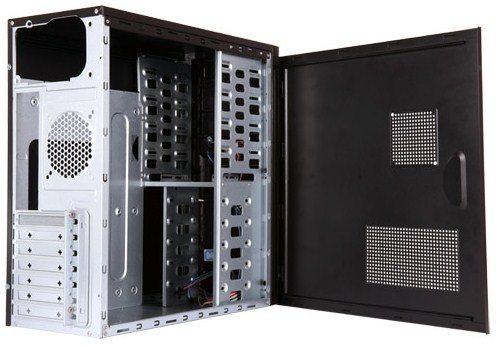
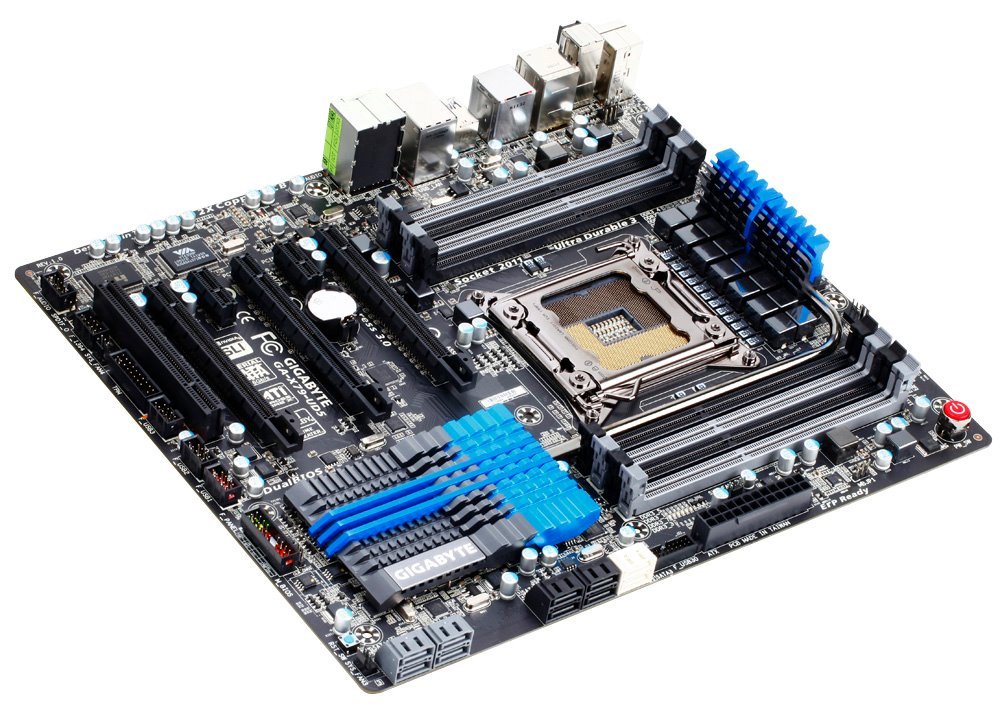
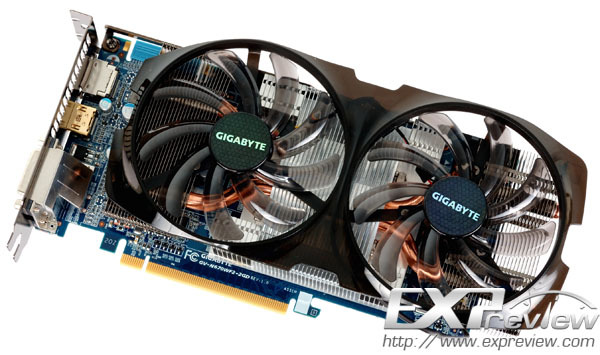
Here are some of the first pictures of Gigabyte GeForce GTX 670
WindForce 2X graphics card, which was released towards the end of July,
without much fuss. The pictures reveal what is a combination of a
non-reference design compact PCB design by Gigabyte, making use of its
Ultra Durable VGA component selection (2 oz copper PCB, Japanese
solid-state capacitors, binned memory chips, ferrite core chokes, low
RDS (on) MOSFETs), and its WindForce 2X cooler. The PCB uses a 4+2 phase
VRM to power the GK104 GPU. It draws power from two 6-pin PCIe power
connectors.
The card ships in two variants, one that sticks to NVIDIA-reference
clock speeds, and an OC variant (941 MHz core, 1019 MHz GPU Boost, 6.00
GHz memory). The cooler uses a compound heatsink. Its design consists of
a main central aluminum heatsink which draws heat from the GPU, while
two satellite aluminum fin heatsinks draw heat from the GPU through two 8
mm-thick copper heat pipes. The heatsink is ventilated by a pair of 100
mm fans, which spin at low speeds and claim low noise levels.
Gigabyte's WindForce 2X graphics card is expected to cost less than its
flagship WindForce 3X. Find a review at the source.
Source: Expreview
Showing posts with label Gigabyte. Show all posts
Sunday, August 5, 2012
Wednesday, February 15, 2012
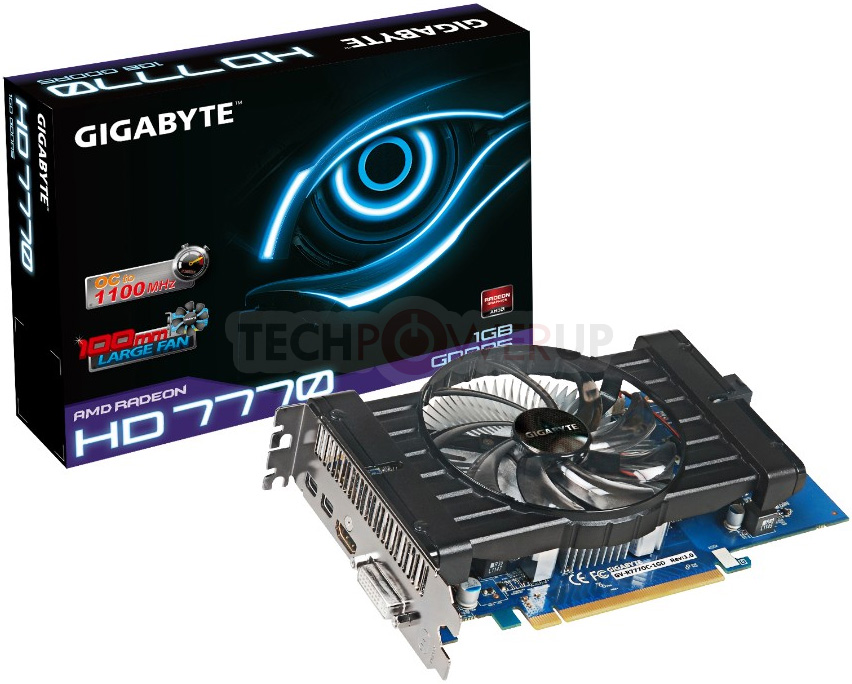
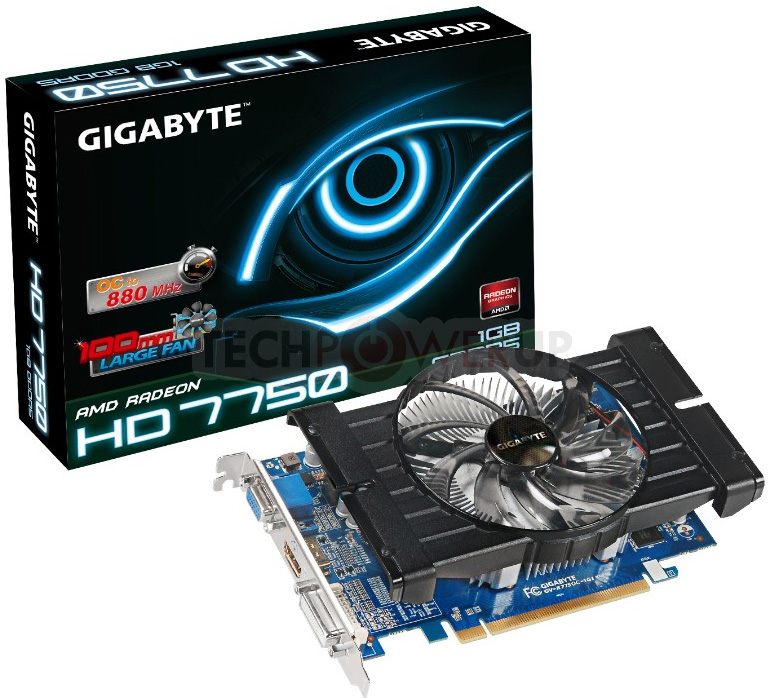
GIGABYTE Unveils its Radeon HD 7700 Series
GIGABYTE kicked off its Radeon HD 7700 series with a trio of graphics
cards, the Radeon HD 7770 GV-R777D5-1GD (AMD reference speeds), the
Radeon HD 7770 GV-R777OC-1GD (factory overclocked speeds of 1100 MHz
core, 4.50 GHz memory), and the Radeon HD 7750 GV-R775OC-1GI (factory
overclocked speeds of 880 MHz core, 4.50 GHz memory). The company didn't
release a reference-speed Radeon HD 7750. All three cards are based on
non-reference board designs by Gigabyte, consisting of Ulra Durable VGA+
PCBs and optimized large-fan (translates to lower RPM, lower noise)
fan-heatsinks.
Source
Source
Thursday, January 19, 2012
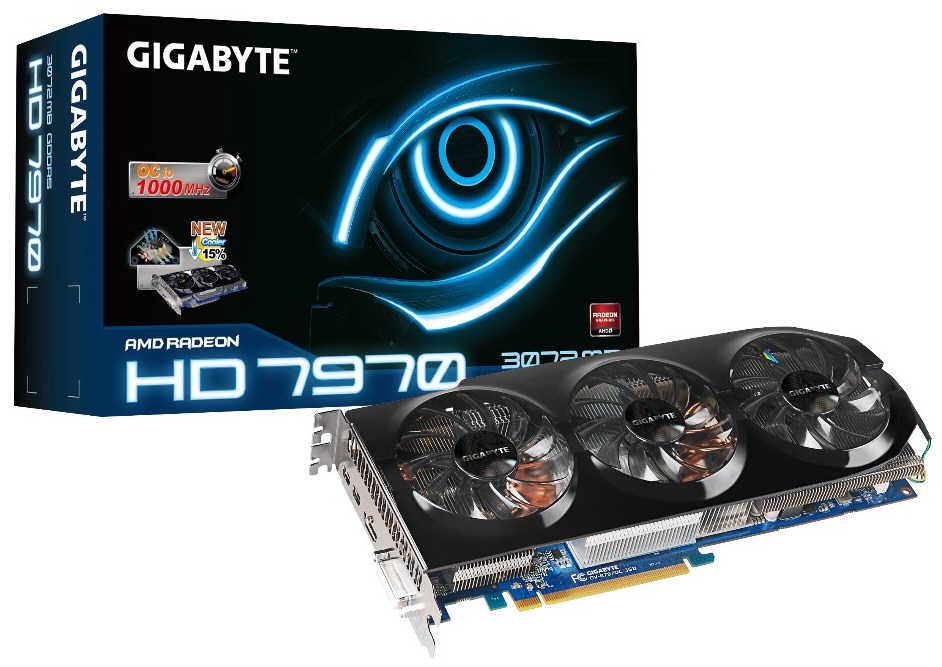
Gigabyte's Custom-Cooled, Overclocked Radeon HD 7970 Gets Official
Gigabyte Technology has now added to its website a second Radeon HD 7970 graphics card, the (previously-leaked)
model codenamed GV-R797OC-3GD which features a dual-slot, triple-fan
cooler, a custom PCB, and a GPU clocked at 1000 MHz (the standard
frequency is 925 MHz).
Gigabyte's customized HD 7970 also has an Ultra Durable VGA construction (2oz copper PCB, Tier 1 memory, Japanese Solid Capacitor, Ferrite Core Chokes, Low RDS (on) MOSFET), a 384-bit memory interface, 3 GB of GDDR5 VRAM set to 5500 MHz (no overclock here, unfortunately), DVI, HDMI and dual Mini DisplayPort outputs, and CrossFireX support. The GV-R797OC-3GD's price tag has yet to be revealed.
Source
Gigabyte's customized HD 7970 also has an Ultra Durable VGA construction (2oz copper PCB, Tier 1 memory, Japanese Solid Capacitor, Ferrite Core Chokes, Low RDS (on) MOSFET), a 384-bit memory interface, 3 GB of GDDR5 VRAM set to 5500 MHz (no overclock here, unfortunately), DVI, HDMI and dual Mini DisplayPort outputs, and CrossFireX support. The GV-R797OC-3GD's price tag has yet to be revealed.
Source
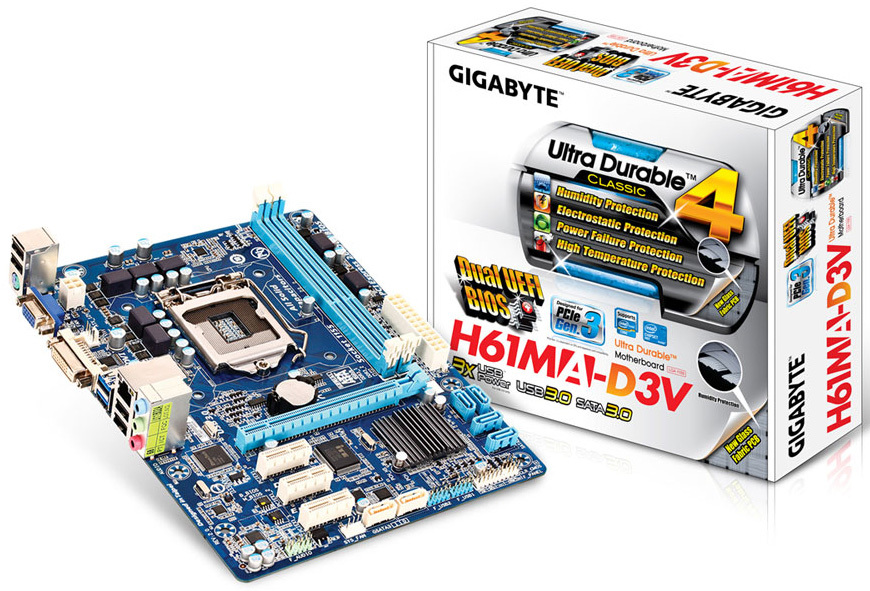
GIGABYTE Releases its First Entry-Level Motherboard with Dual-UEFI BIOS
After trying to avoid UEFI BIOS by sticking to "HybridEFI" workarounds
to its existing AwardBIOS code on most of its socket LGA1155 and AM3+
motherboards, GIGABYTE reluctantly transitioned to UEFI with its socket
LGA2011 motherboards, on which it fused its innovative Dual-BIOS
technology with UEFI to come up with Dual-UEFI technology. One can
imagine this to be particularly tough to implement on lower-end models,
since UEFI with graphical setup program requires higher-capacity EEPROM
chips, and since Dual-UEFI would need two, it would stress component
costs, but GIGABYTE did it anyway.
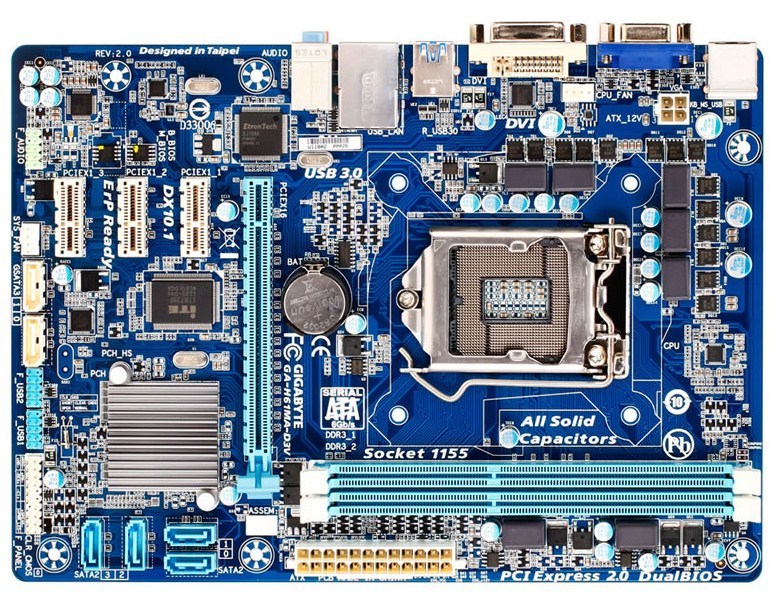
In Japan, the company released the latest revision of the GA-H61MA-D3V (rev. 2.0), an entry-level socket LGA1155 motherboard based on the Intel H61 chipset, which features Dual-UEFI. Apart from this, the board also features GIGABYTE's Ultra-Durable 4 Classic component loadout, which consists of a new fiberglass fabric weave PCB that's more resistant to humidity that causes short-circuits, high ESD-resistance ICs, anti-surge ICs located on critical circuits, low RDS (on) MOSFETs, and a 100% high-grade solid-state capacitor design.
The CPU is powered by a 5-phase VRM, it is wired to two DDR3 DIMM slots supporting up to 16 GB of dual-channel DDR3 memory. Expansion slots include one PCI-Express 3.0 x16, and three PCIe x1. The move to exclude legacy PCI is not only progressive, but could also save GIGABYTE the cost of placing a PCI-PCIe bridge chip. Storage connectivity includes two SATA 6 Gb/s ports from Marvell 88SE9172 (since H61 PCH lacks SATA 6 Gb/s), and four SATA 3 Gb/s ports from the PCH. Other connectivity includes 6-channel HD audio (driven by Realtek ALC887), two USB 3.0 ports (driven by EtronTech EJ168), gigabit Ethernet (driven by Realtek 8111E), and a number of USB 2.0 ports. Display connectivity includes DVI and D-Sub.
Source
In Japan, the company released the latest revision of the GA-H61MA-D3V (rev. 2.0), an entry-level socket LGA1155 motherboard based on the Intel H61 chipset, which features Dual-UEFI. Apart from this, the board also features GIGABYTE's Ultra-Durable 4 Classic component loadout, which consists of a new fiberglass fabric weave PCB that's more resistant to humidity that causes short-circuits, high ESD-resistance ICs, anti-surge ICs located on critical circuits, low RDS (on) MOSFETs, and a 100% high-grade solid-state capacitor design.
The CPU is powered by a 5-phase VRM, it is wired to two DDR3 DIMM slots supporting up to 16 GB of dual-channel DDR3 memory. Expansion slots include one PCI-Express 3.0 x16, and three PCIe x1. The move to exclude legacy PCI is not only progressive, but could also save GIGABYTE the cost of placing a PCI-PCIe bridge chip. Storage connectivity includes two SATA 6 Gb/s ports from Marvell 88SE9172 (since H61 PCH lacks SATA 6 Gb/s), and four SATA 3 Gb/s ports from the PCH. Other connectivity includes 6-channel HD audio (driven by Realtek ALC887), two USB 3.0 ports (driven by EtronTech EJ168), gigabit Ethernet (driven by Realtek 8111E), and a number of USB 2.0 ports. Display connectivity includes DVI and D-Sub.
Source
Wednesday, December 28, 2011
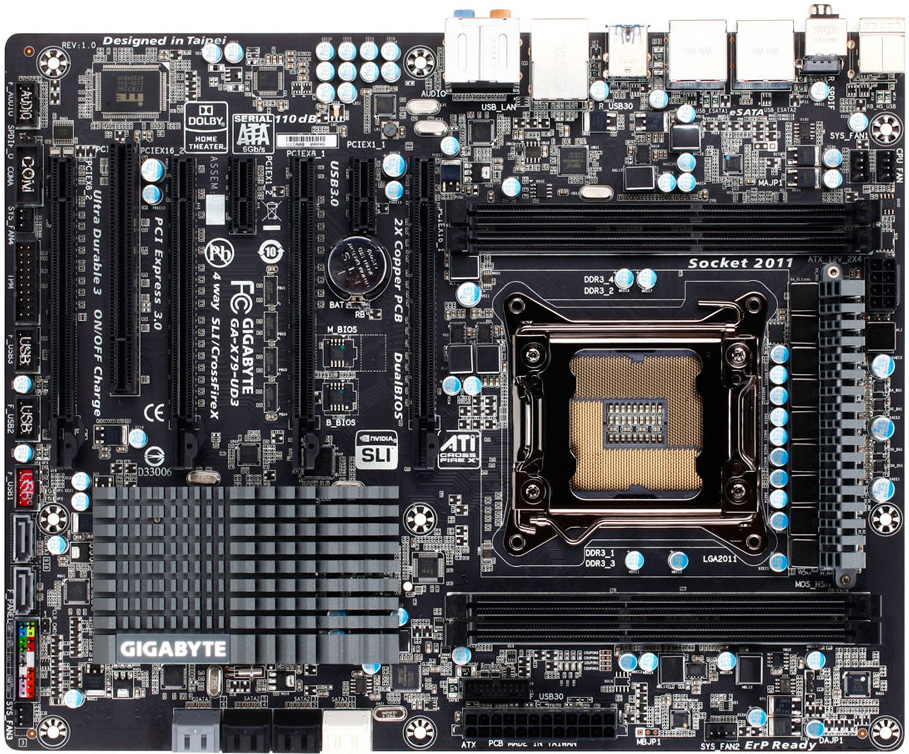
Gigabyte Recalling X79 UD3, UD5, G1.Assassin 2 Motherboards
Last week, a Taiwanese overclocker putting his OC workbench through an
relatively laxed OC stress test saw its Gigabyte X79 UD3 motherboard go
bust. Its CPU VRM couldn't cope with the stress, and blew a MOSFET. At
the time, people responding to his video condoled him for his bad luck.
It appears now that his wasn't a one-off case of "bad-egg". Gigabyte, in
its latest press release on its Chinese website, noted the issue.
Apparently it received several such complaints from overclockers where
even moderate voltage-assisted CPU OC fried its VRM. The issue was found
to be widespread, among three of its main socket LGA2011 products, the
GA-X79-UD3, GA-X79-UD5, and G1.Assassin 2.
Apparently, the issue is caused by a cocktail of bad firmware to complement the board's PWM circuitry, and bad quality PWM components. As an immediate remedy, Gigabyte issued a BIOS update for the affected products. This BIOS, however, will cripple the board's overclocking abilities. The new BIOS will throttle CPU when subjected to extreme stress, to save the VRM. The BIOS remedy is only for those who opt to keep their boards, or don't subject the board to extreme tuning. The other remedy, is to return the board to Gigabyte, for a free replacement when the "right" boards are available. Gigabyte also announced a general recall of the GA-X79-UD3, GA-X79-UD5, and G1.Assassin 2, from the market. A video of the "unlucky" (not anymore) overclocker's day going bad, can be watched here.
Source: Gigabyte
Apparently, the issue is caused by a cocktail of bad firmware to complement the board's PWM circuitry, and bad quality PWM components. As an immediate remedy, Gigabyte issued a BIOS update for the affected products. This BIOS, however, will cripple the board's overclocking abilities. The new BIOS will throttle CPU when subjected to extreme stress, to save the VRM. The BIOS remedy is only for those who opt to keep their boards, or don't subject the board to extreme tuning. The other remedy, is to return the board to Gigabyte, for a free replacement when the "right" boards are available. Gigabyte also announced a general recall of the GA-X79-UD3, GA-X79-UD5, and G1.Assassin 2, from the market. A video of the "unlucky" (not anymore) overclocker's day going bad, can be watched here.
Source: Gigabyte
Saturday, November 26, 2011
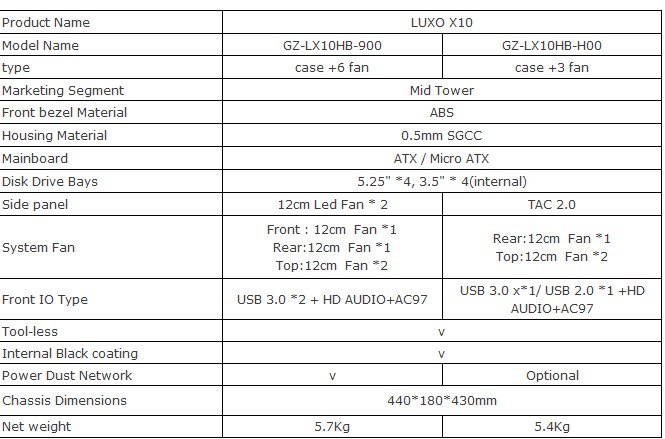
GIGABYTE Announces the LUXO X10 Gaming Chassis
GIGABYTE’s brand new chassis, designed with the combination of
innovative technology and powerful performance to cater to the needs of
global professional gamers and designers. LUXO X10 is a powerful best
selling gaming model, bringing along superior experience of approachable
luxury, maximum convenience and great flexibility.
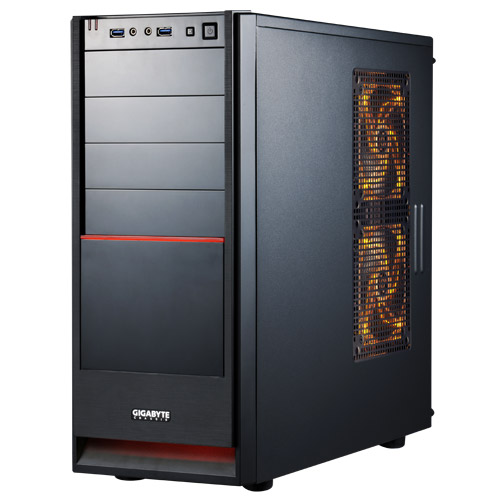
At the first glimpse of the case, people cannot help but notice its minimalism modern appearance. The classical combination of black and red emits an air of sophistication and delicate passion. A feeling of freshness is shining through the side panel blazing LED lights. Nevertheless, this new model is more than just good looks.
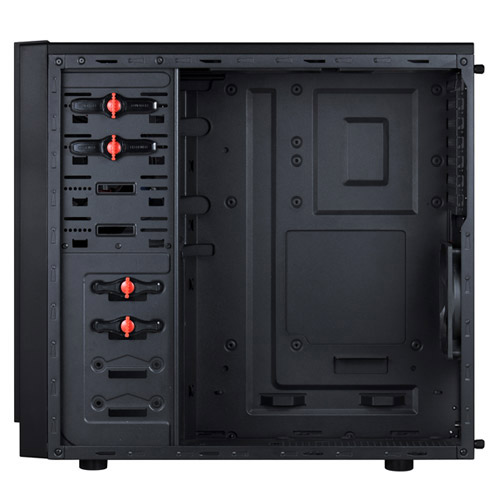
With the key features of LUXO X10--right side installation, adjusting the place of 5.25” device makes more room for long VGA cards, which enhances visual enjoyment for those enthusiastic gamers out there. The right side installation design also shortens the distance between PSU and motherboard/CPU pin. Every PSU, from high-end to budget ones, can support bottom side PSU installation. No more cable restriction.
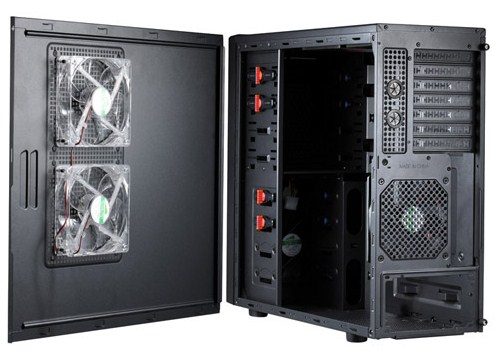
Apart from the key features, a set of other practical features makes it the best choice for astute consumers. The I/O port is situated at the top for an easier access, and two USB 3.0 ports offer remarkable transmission speed. LUXO X10 also comes with four cooling fans and can support up to six to ensure superior ventilation and prolongs the lifespan of all the gadgets inside. Clip-lock and lever mechanisms; cable-managed interior with cables all clamped and managed allowing the internal routing looks neat and maximizes the airflow. Last but not least, it offers a thoughtful design at the bottom--removable power dust filter so that your case won’t be clogged by those crazy dust bunnies.
For more information, visit the product page.
At the first glimpse of the case, people cannot help but notice its minimalism modern appearance. The classical combination of black and red emits an air of sophistication and delicate passion. A feeling of freshness is shining through the side panel blazing LED lights. Nevertheless, this new model is more than just good looks.
With the key features of LUXO X10--right side installation, adjusting the place of 5.25” device makes more room for long VGA cards, which enhances visual enjoyment for those enthusiastic gamers out there. The right side installation design also shortens the distance between PSU and motherboard/CPU pin. Every PSU, from high-end to budget ones, can support bottom side PSU installation. No more cable restriction.
Apart from the key features, a set of other practical features makes it the best choice for astute consumers. The I/O port is situated at the top for an easier access, and two USB 3.0 ports offer remarkable transmission speed. LUXO X10 also comes with four cooling fans and can support up to six to ensure superior ventilation and prolongs the lifespan of all the gadgets inside. Clip-lock and lever mechanisms; cable-managed interior with cables all clamped and managed allowing the internal routing looks neat and maximizes the airflow. Last but not least, it offers a thoughtful design at the bottom--removable power dust filter so that your case won’t be clogged by those crazy dust bunnies.
For more information, visit the product page.
Tuesday, November 15, 2011
GIGABYTE Launches X79 Series Motherboards
GIGABYTE TECHNOLGY Co. Ltd., a leading manufacturer of motherboards and
graphics cards, today announced the launch of their latest X79 series
enthusiast motherboard range. Supporting the latest 2nd Generation Intel
Core i7 processor family for high-end desktops, these new X79 Express
Chipset motherboards unite unrivalled desktop PC performance with a new
level of hardware flexibility and control. GIGABYTE 3D Power and its all
new 3-way Digital Power Engine offers ultimate control of your PC's
power delivery, while GIGABYTE 3D BIOS provides a wholly more intuitive
and graphical UEFI BIOS environment.
"This new GIGABYTE X79 series range of boards are all about giving enthusiasts and professionals unprecedented control over their PC's hardware," commented Tim Handley, Deputy Director of Motherboard Marketing at GIGABYTE. "GIGABYTE 3D Power and 3D BIOS give hardcore gamers, extreme overclockers and cutting-edge content creators absolute mastery over every aspect of their PC."
GIGABYTE 3D Power
GIGABYTE X79 series motherboards take advantage of the new and exclusive GIGABYTE 3D Power, based on a 3-way Digital Power Engine for both the PWM and memory that delivers unprecedented power delivery control. Utilizing a brand new Digital PWM controller,GIGABYTE's 3D Power features three digital memory controllers for not only the memory, but VTT and VSA, for real-time adjustment and control. The GIGABYTE 3D Power application provides a range of controls via a graphical user interface, allowing adjustment of load line calibration, over voltage protection control and real-time adjustment of CPU, VTT, IMC and four-channel memory frequencies.
GIGABYTE 3D BIOS with Dual-UEFI
Based on our new UEFI DualBIOS technology, GIGABYTE 3D BIOS re-imagines the traditional BIOS environment to make it more accessible for novice users than ever before. GIGABYTE 3D BIOS provides a full featured advanced mode for veteran BIOS users, alongside a graphical 3D Mode which offers a far more intuitive BIOS experience that makes it easier to understand how BIOS settings affect their PC's hardware performance.
Intel X79 Platform Highlights
All GIGABYTE X79 series motherboards are designed to get the absolute best performance from the latest 2nd generation Intel Core i7 processors, bringing a number of new enthusiast-class features to Intel's latest extreme platform. Featuring the new LGA 2011 socket and based on the latest updated micro-architecture, these new processors feature up to six cores with up to 15MB L3 cache and four-channel DDR3 memory. With an unprecedented 40 PCI Express lanes, enthusiast gamers can also enjoy the absolute maximum GPU performance in Multi-GPU SLI and CrossFireX configurations.
GIGABYTE G1.Assassin 2
Designed as the base for the ultimate in gaming PC builds, the GIGABYTE G1.Assassin 2 motherboard combines the unrivalled performance of this new X79 platform with our award-winning G1.Killer design philosophy: onboard discrete-class audio is offered courtesy of the Creative Digital Audio processor (20K2) which offers X-Fi Xtreme Fideility and EAX Advanced HD Audio 5.0 technologies, while the Killer E2100 Game Networking Platform offers advanced network optimization and management for the very best online gaming experience. 3-way SLI and CrossFireX capability means users can really push the boundaries of 3D gaming to new heights.
GIGABYTE X79-UD7
The GIGABYTE X79-UD7 motherboard is designed to provide CPU performance worthy of champions, with specific built-in technologies for extreme overclocking configurations. The X79-UD7 features an all digital PWM, four full length PCIe slots for 4-way GPU configurations plus a range of features that mean overclockers will never tire of tweaking the latest 2nd generation Intel Core i7 processors. With GIGABYTE’s exclusive OC-VRM, you'll find POScaps that ensure easy insulation, while OC-Touch lets users tweak in real-time using onboard buttons to change multiplier frequencies. OC-DualBIOS is complimented with a BIOS Switcher button that offers fast back-panel access to two distinct BIOS configurations. A Clear CMOS button is also included along with an OC button for instant OC profile loading. OC-PEG offers additional discrete graphics array power via the SATA rail with two SATA ports, guaranteeing all the power needed for extreme 4-way SLI and CrossfireX configurations.
GIGABYTE X79-UD5
The GIGABYTE X79-UD5 motherboard provides the ultimate media processing workstation. Design and Engineering professionals that employ the latest CAD and multimedia creation software will be impressed with eight DDR3 memory slots combined with GIGABYTE's unique 3D Power design to offer the ultimate platform for memory and CPU intensive workloads. We've also included back panel access overclocking via a simple OC button so that you can get an instant boost in performance when needed.
Exclusive GIGABYTE Bluetooth 4.0 / Wi-Fi Expansion Card
GIGABYTE X79 series motherboards will also include an exclusive PCIe expansion card that offers support for the latest Bluetooth 4.0 and IEEE 802.11 b/g/n Wi-Fi connectivity. The new Bluetooth 4.0 standard includes Smart Ready technology that is debuting on mobile devices including the new Apple iPhone 4S. This means that transferring important content from your smart phone or tablet is easier and faster than ever.
For more information, visit the product pages of:
Or visit the microsite.
Source
"This new GIGABYTE X79 series range of boards are all about giving enthusiasts and professionals unprecedented control over their PC's hardware," commented Tim Handley, Deputy Director of Motherboard Marketing at GIGABYTE. "GIGABYTE 3D Power and 3D BIOS give hardcore gamers, extreme overclockers and cutting-edge content creators absolute mastery over every aspect of their PC."
GIGABYTE 3D Power
GIGABYTE X79 series motherboards take advantage of the new and exclusive GIGABYTE 3D Power, based on a 3-way Digital Power Engine for both the PWM and memory that delivers unprecedented power delivery control. Utilizing a brand new Digital PWM controller,GIGABYTE's 3D Power features three digital memory controllers for not only the memory, but VTT and VSA, for real-time adjustment and control. The GIGABYTE 3D Power application provides a range of controls via a graphical user interface, allowing adjustment of load line calibration, over voltage protection control and real-time adjustment of CPU, VTT, IMC and four-channel memory frequencies.
GIGABYTE 3D BIOS with Dual-UEFI
Based on our new UEFI DualBIOS technology, GIGABYTE 3D BIOS re-imagines the traditional BIOS environment to make it more accessible for novice users than ever before. GIGABYTE 3D BIOS provides a full featured advanced mode for veteran BIOS users, alongside a graphical 3D Mode which offers a far more intuitive BIOS experience that makes it easier to understand how BIOS settings affect their PC's hardware performance.
Intel X79 Platform Highlights
All GIGABYTE X79 series motherboards are designed to get the absolute best performance from the latest 2nd generation Intel Core i7 processors, bringing a number of new enthusiast-class features to Intel's latest extreme platform. Featuring the new LGA 2011 socket and based on the latest updated micro-architecture, these new processors feature up to six cores with up to 15MB L3 cache and four-channel DDR3 memory. With an unprecedented 40 PCI Express lanes, enthusiast gamers can also enjoy the absolute maximum GPU performance in Multi-GPU SLI and CrossFireX configurations.
GIGABYTE G1.Assassin 2
Designed as the base for the ultimate in gaming PC builds, the GIGABYTE G1.Assassin 2 motherboard combines the unrivalled performance of this new X79 platform with our award-winning G1.Killer design philosophy: onboard discrete-class audio is offered courtesy of the Creative Digital Audio processor (20K2) which offers X-Fi Xtreme Fideility and EAX Advanced HD Audio 5.0 technologies, while the Killer E2100 Game Networking Platform offers advanced network optimization and management for the very best online gaming experience. 3-way SLI and CrossFireX capability means users can really push the boundaries of 3D gaming to new heights.
GIGABYTE X79-UD7
The GIGABYTE X79-UD7 motherboard is designed to provide CPU performance worthy of champions, with specific built-in technologies for extreme overclocking configurations. The X79-UD7 features an all digital PWM, four full length PCIe slots for 4-way GPU configurations plus a range of features that mean overclockers will never tire of tweaking the latest 2nd generation Intel Core i7 processors. With GIGABYTE’s exclusive OC-VRM, you'll find POScaps that ensure easy insulation, while OC-Touch lets users tweak in real-time using onboard buttons to change multiplier frequencies. OC-DualBIOS is complimented with a BIOS Switcher button that offers fast back-panel access to two distinct BIOS configurations. A Clear CMOS button is also included along with an OC button for instant OC profile loading. OC-PEG offers additional discrete graphics array power via the SATA rail with two SATA ports, guaranteeing all the power needed for extreme 4-way SLI and CrossfireX configurations.
GIGABYTE X79-UD5
The GIGABYTE X79-UD5 motherboard provides the ultimate media processing workstation. Design and Engineering professionals that employ the latest CAD and multimedia creation software will be impressed with eight DDR3 memory slots combined with GIGABYTE's unique 3D Power design to offer the ultimate platform for memory and CPU intensive workloads. We've also included back panel access overclocking via a simple OC button so that you can get an instant boost in performance when needed.
Exclusive GIGABYTE Bluetooth 4.0 / Wi-Fi Expansion Card
GIGABYTE X79 series motherboards will also include an exclusive PCIe expansion card that offers support for the latest Bluetooth 4.0 and IEEE 802.11 b/g/n Wi-Fi connectivity. The new Bluetooth 4.0 standard includes Smart Ready technology that is debuting on mobile devices including the new
For more information, visit the product pages of:
Or visit the microsite.
Source
Tuesday, November 8, 2011
Gigabyte Shows Off 3D Power Technology for Upcoming Motherboards
Last week we got a glimpse of Gigabyte's new 3D BIOS technology,
a UEFI setup program with an innovative and functional user interface
built into Gigabyte's upcoming X79 motherboards. Today Gigabyte released
a new video detailing another such innovation, called 3D Power. This
program gives you total and unrestricted control over the three main
dimensions of your motherboard's power delivery: voltages, PWM
frequency, and phase control. Gigabyte announced that all its upcoming
X79 motherboards will feature PWM (pulse width modulation) CPU power
design, backed by highly capable PWM controllers that give you a
plethora of things you can tweak.
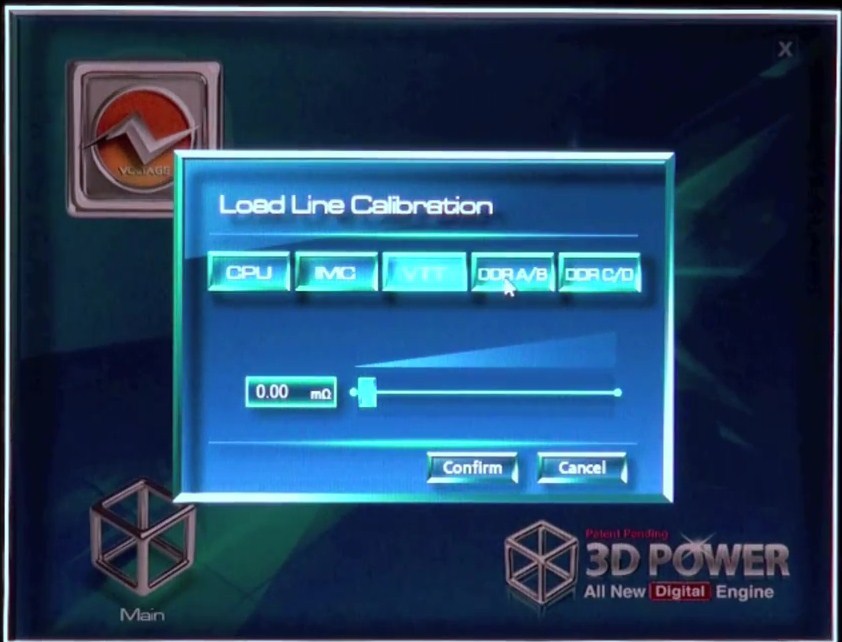
To begin with, the 3D Power application starts up with a cube that has the icons of the three main elements. Clicking on "voltage" gives you control over voltage-related settings in three main pages, turbo voltage response, load line calibration (active V-droop control), and active over-voltage protection. Load line calibration allows you to fine-tune the extant of V-droop correction over a variety of power domains, such as CPU, VTT, IMC, and DRAM.
Moving on to Phase Control, and this page gives you settings related to the phases. You can select the number of CPU phases you want active (from the number available), and thereby balance efficiency and power delivery, to do this you can select between six phase-arrangement presets from "Lite Power" all the way up to "Extreme Performance". Then there are other pages that let you configure thermal protection.
Lastly there's frequency. Pulse width modulation is a method of controlling power-delivery by delivering power in pulses to inertial electrical devices. PWM frequency related pages give you access to some very low-level settings such as CPU, VTT, IMC, and DRAM PWM frequencies.
Unlike 3D BIOS, which resides on the motherboard's EEPROM and can be invoked by hitting DEL on system startup, 3D Power is a Windows-based application. One can expect most settings not to be on-the-fly, and requiring system restarts. A press video from Gigabyte can be watched here.
Source
To begin with, the 3D Power application starts up with a cube that has the icons of the three main elements. Clicking on "voltage" gives you control over voltage-related settings in three main pages, turbo voltage response, load line calibration (active V-droop control), and active over-voltage protection. Load line calibration allows you to fine-tune the extant of V-droop correction over a variety of power domains, such as CPU, VTT, IMC, and DRAM.
Moving on to Phase Control, and this page gives you settings related to the phases. You can select the number of CPU phases you want active (from the number available), and thereby balance efficiency and power delivery, to do this you can select between six phase-arrangement presets from "Lite Power" all the way up to "Extreme Performance". Then there are other pages that let you configure thermal protection.
Lastly there's frequency. Pulse width modulation is a method of controlling power-delivery by delivering power in pulses to inertial electrical devices. PWM frequency related pages give you access to some very low-level settings such as CPU, VTT, IMC, and DRAM PWM frequencies.
Unlike 3D BIOS, which resides on the motherboard's EEPROM and can be invoked by hitting DEL on system startup, 3D Power is a Windows-based application. One can expect most settings not to be on-the-fly, and requiring system restarts. A press video from Gigabyte can be watched here.
Source
Monday, November 7, 2011
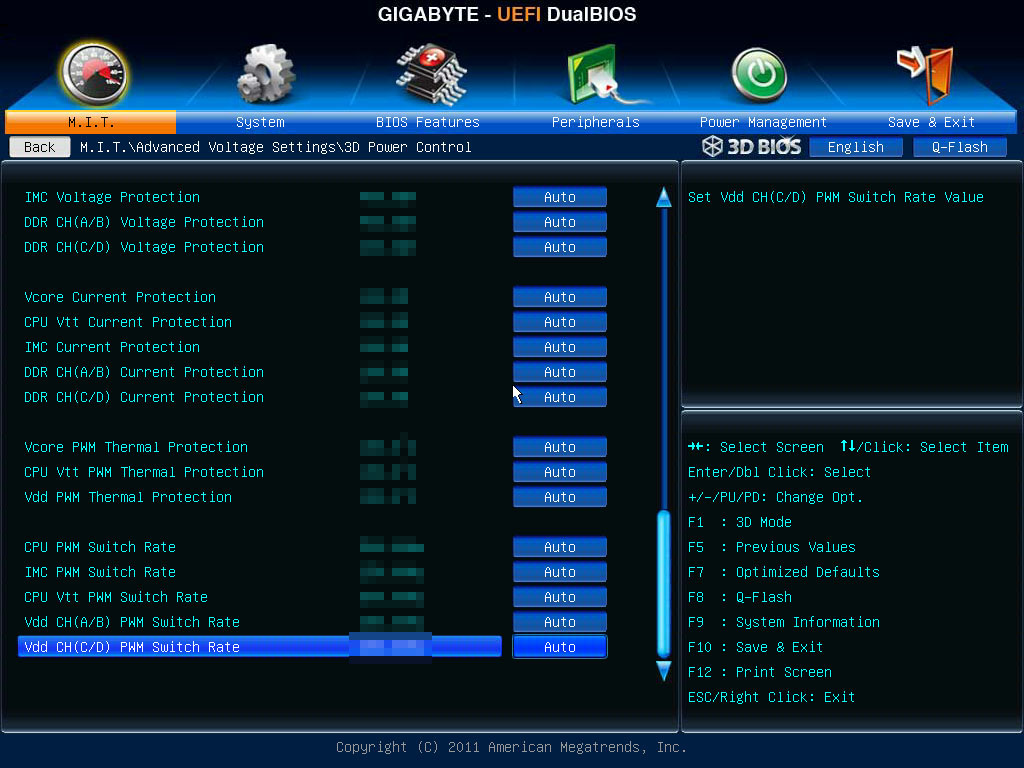
Gigabyte Makes Up For Late UEFI Adoption with 3D UEFI Setup Program
With the Sandy Bridge LGA1155 platform, announced at the start of this
year, the PC motherboard industry saw a wide transition to UEFI, a new
board firmware that overcomes many of the limitations of the decades old
BIOS, including the archaic user interface. The second biggest
motherboard vendor by volumes, Gigabyte, wasn't part of that wave. It
continued to use dated Phoenix AwardBIOS with a few riders that made it
look like the company was dragging its feet over UEFI adoption.
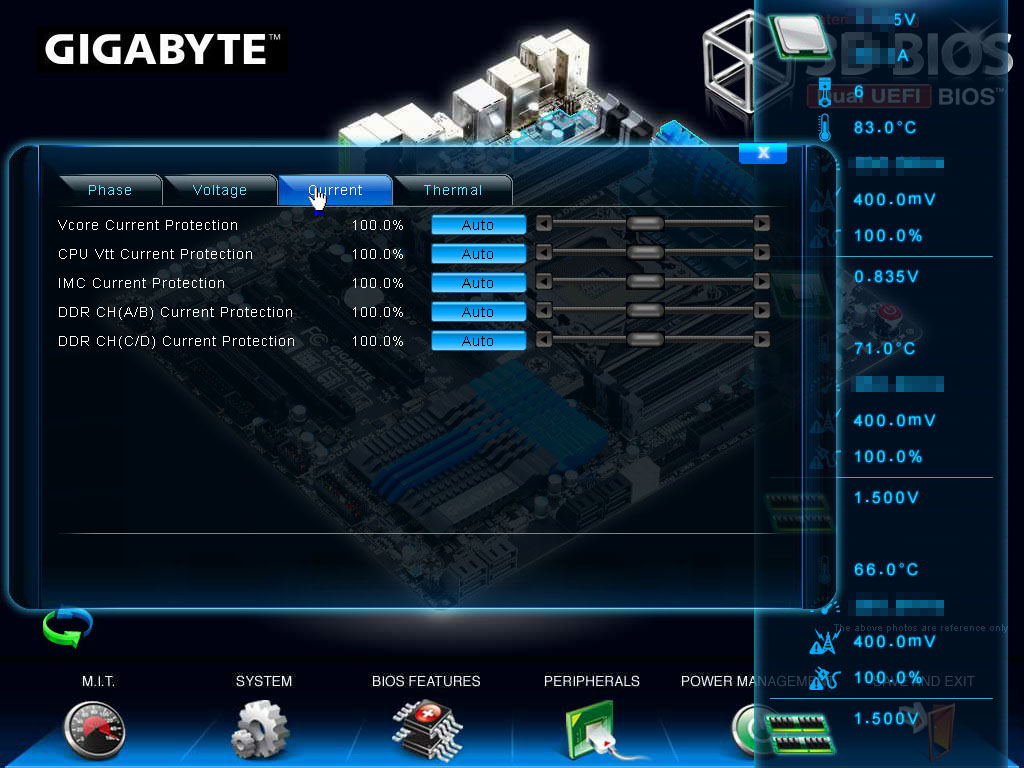
First, it tried to address the 2.2 TB boot volume size limitation by coming up with an address-space tweak it ended up calling HybridEFI (which has nothing to do with EFI). Next, it addressed the need for a more intuitive (preferably GUI) setup program with a Windows-based CMOS setup program called TouchBIOS, it came with the Fisher Price looking interface that every other manufacturer's UEFI setup program had, topped off with touchscreen support. However, faced with the inevitability of facing lack of support for Ivy Bridge (more here) and Sandy Bridge-E, the company decided to take the plunge. It wants to come up with something that's a lot more functional than most others' UEFI setup programs that feel like the same old interfaces skinned. Enter Gigabyte 3D BIOS.
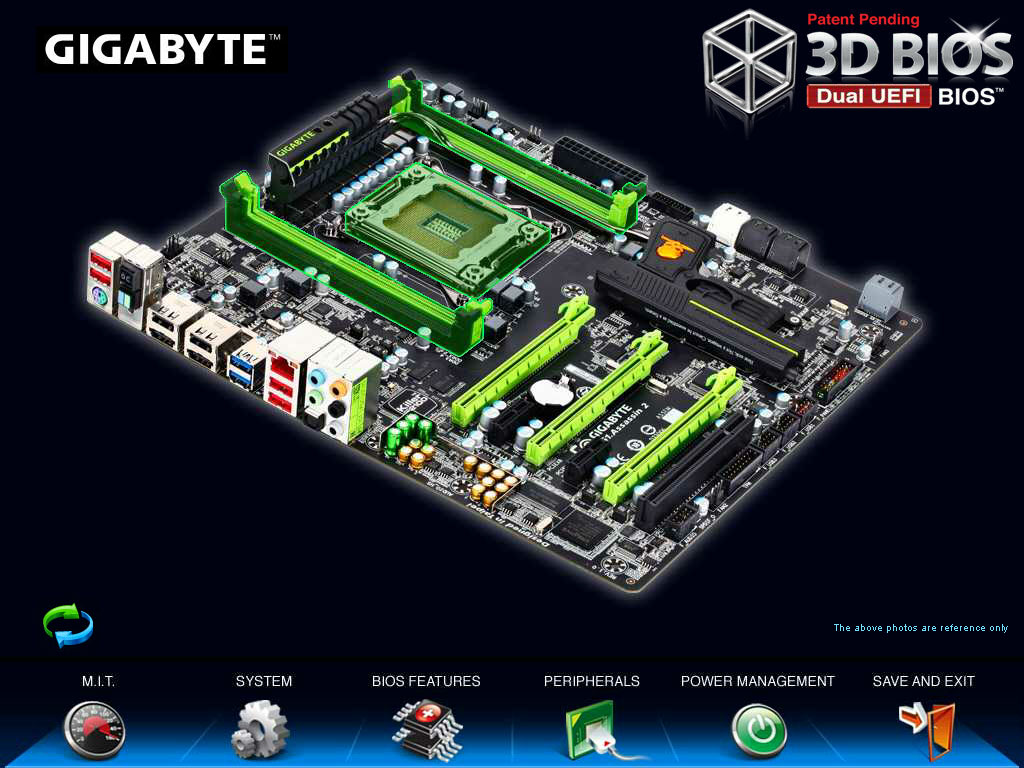
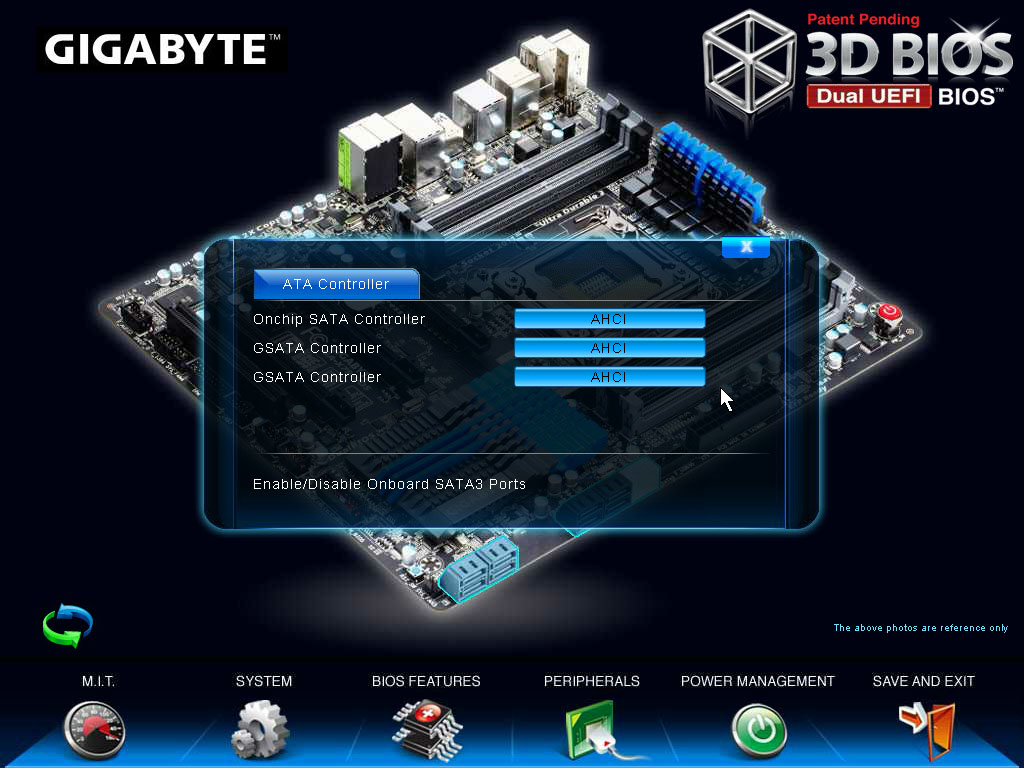
It works like this: When you hit DEL at POST to load up the setup program, it starts up the 3D BIOS home screen. On the home screen, you find a 3D rotatable image of your motherboard. You can use your mouse to spin the board around. And what's the utility of that you ask? Get this - certain parts of that motherboard image can be clicked to open up settings related to it. For example, you can click on a set of SATA ports on that rotatable image, and the program will open up SATA controller settings related to it. You can click on the memory slots, and presto all the memory tuning settings show up in a window.
That's not all, the visual elements are simply stunning, with smooth fonts, curves, and lavish use of alpha. The fine tuning pages don't feel merely like a skinned, mouse-enabled version of the old interface, but some genuine GUI elements such as sliders, tickboxes, radio buttons, and tabs are used. There is an element that looks like Windows Explorer address bar, which gives you a tree view of exactly which configuration page you're on, so you can trace back to other related settings. A video demo of this can be watched here.
Gigabyte is using an AMI UEFI backend, coupled with its own patented DualBIOS technology that protects against bad flashes. Props to Gigabyte for a truly GUI setup program.
Source: Anandtech
First, it tried to address the 2.2 TB boot volume size limitation by coming up with an address-space tweak it ended up calling HybridEFI (which has nothing to do with EFI). Next, it addressed the need for a more intuitive (preferably GUI) setup program with a Windows-based CMOS setup program called TouchBIOS, it came with the Fisher Price looking interface that every other manufacturer's UEFI setup program had, topped off with touchscreen support. However, faced with the inevitability of facing lack of support for Ivy Bridge (more here) and Sandy Bridge-E, the company decided to take the plunge. It wants to come up with something that's a lot more functional than most others' UEFI setup programs that feel like the same old interfaces skinned. Enter Gigabyte 3D BIOS.
It works like this: When you hit DEL at POST to load up the setup program, it starts up the 3D BIOS home screen. On the home screen, you find a 3D rotatable image of your motherboard. You can use your mouse to spin the board around. And what's the utility of that you ask? Get this - certain parts of that motherboard image can be clicked to open up settings related to it. For example, you can click on a set of SATA ports on that rotatable image, and the program will open up SATA controller settings related to it. You can click on the memory slots, and presto all the memory tuning settings show up in a window.
That's not all, the visual elements are simply stunning, with smooth fonts, curves, and lavish use of alpha. The fine tuning pages don't feel merely like a skinned, mouse-enabled version of the old interface, but some genuine GUI elements such as sliders, tickboxes, radio buttons, and tabs are used. There is an element that looks like Windows Explorer address bar, which gives you a tree view of exactly which configuration page you're on, so you can trace back to other related settings. A video demo of this can be watched here.
Gigabyte is using an AMI UEFI backend, coupled with its own patented DualBIOS technology that protects against bad flashes. Props to Gigabyte for a truly GUI setup program.
Source: Anandtech
Thursday, November 3, 2011
Gigabyte to Pack Wireless-N and Bluetooth 4.0 Addon Card with Some X79 Boards
There sure is going to be fierce competition between motherboard vendors
once "Sandy Bridge-E" Core i7 processors come out, a little later this
month. Even the tiniest edge over competitors in terms of features can
go a long way with market success. Gigabyte is ready with one such
feature of its own: the Bluetooth 4.0 + WiFi b/g/n card, which it will
bundle with the GA-X79-UD5, GA-X79-UD7(OC), and G1.Assassin 2. Simply
put, this is a special addon card that will provide a Wireless b/g/n
(wireless n at 150 Mbps), and Bluetooth 4.0 (24 Mbps) connectivity.
Here's how it works: the card sits on one of the board's PCI-Express x1 slots (or any PCIe slot for that matter), the PCIe connection is wired to the wireless network controller on the mini-PCIe card. We expect this to be a common Atheros AR9285-based card. The main card also has a Bluetooth 4.0 controller, which connects to the system using USB 2.0. A cable runs from the card to any of the board's USB 2.0 front-panel headers. The Bluetooth controller only uses one port, so the other is wired out as an internal USB 2.0 port (good for any DRM dongles you may have). The card is then wired to two antennas (included), one for the wireless network controller, the other for the Bluetooth, both have activity LEDs. It's not known if Gigabyte will sell this card separately, so just about anyone can use it.
Source: VR-Zone
Here's how it works: the card sits on one of the board's PCI-Express x1 slots (or any PCIe slot for that matter), the PCIe connection is wired to the wireless network controller on the mini-PCIe card. We expect this to be a common Atheros AR9285-based card. The main card also has a Bluetooth 4.0 controller, which connects to the system using USB 2.0. A cable runs from the card to any of the board's USB 2.0 front-panel headers. The Bluetooth controller only uses one port, so the other is wired out as an internal USB 2.0 port (good for any DRM dongles you may have). The card is then wired to two antennas (included), one for the wireless network controller, the other for the Bluetooth, both have activity LEDs. It's not known if Gigabyte will sell this card separately, so just about anyone can use it.
Source: VR-Zone
Friday, October 28, 2011
Gigabyte Intros A75N-USB 3.0 Mini-ITX Motherboard for AMD A-Series APUs
Gigabyte released its newest premium HTPC motherboard in the mini-ITX
form-factor, the A75N-USB3. As the name might suggest, this is a socket
FM1 motherboard based on the AMD A75 chipset, and features USB 3.0
connectivity. Despite its compact dimensions, the board crams in
everything a HTPC can benefit from. First, the FM1 socket seats AMD
A-Series accelerated processing units (APUs), which pack up to four
x86-64 cores with up to 4 MB cache, dual-channel DDR3-1866 integrated
memory controller, and more importantly, a very powerful integrated
graphics processor in the Radeon HD 6500 class. The FM1 socket on this
board is powered by a 3+1 phase VRM that makes use of driver-MOSFETs.
Power is drawn by a 24-pin ATX and a 4-pin CPU power connector.
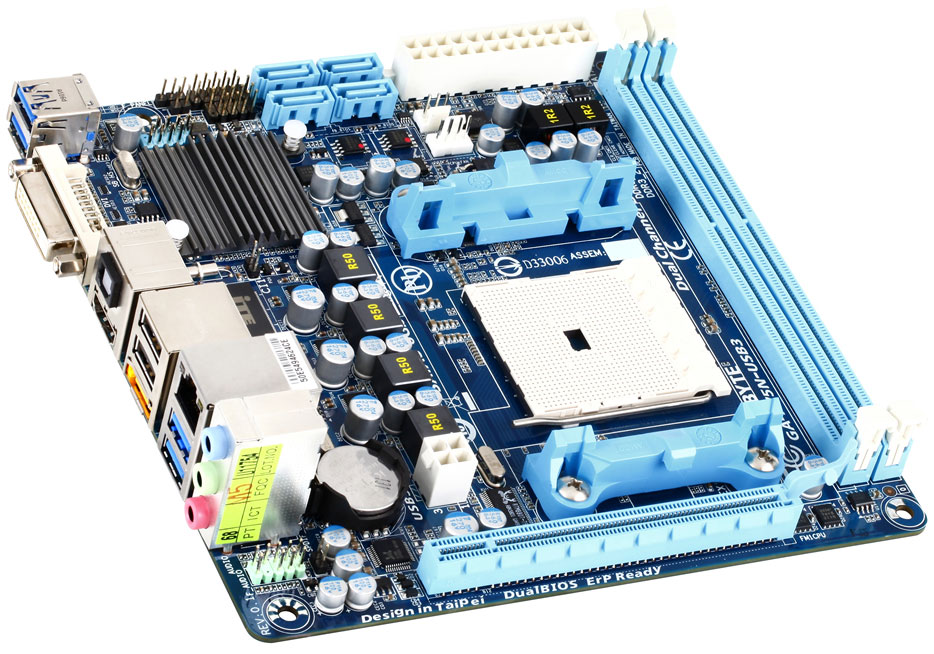
The lone expansion slot is a PCI-Express 2.0 x16. The CPU is wired to two full-length DDR3 DIMM slots, which can take in up to 32 GB (that's right, future 16 GB DIMMs are supported) of dual-channel DDR3-1866 MHz memory. The AMD A75 chipset gives out four internal SATA 6 Gb/s ports, and one eSATA 6 Gb/s port on the rear panel. Display outputs include HDMI 1.4a and DVI. Analog outputs are done away with. Audio is handled by a high-quality Realtek ALC889 HD audio codec. Although this codec supports 8+2 output channels, it is wired to a 5.1 channel shared audio jack cluster, apart from the internal HDA_FP header. Those needing 7.1 channel output can still use the TOSLINK connector, that supports 7.1 channel output with 24-bit, 192 kHz resolution and Dolby Home Theater support. If even that's not enough, the HDMI connector gives you 7.1 channel HDMI audio with Dolby Prologic support.
The lone gigabit Ethernet connection is handled by a Realtek RTL8111E PCIe chip, there are just two USB 2.0 ports apart from two more via internal header, but there are as many as four USB 3.0 ports on the rear panel, driven by the AMD A75 chipset's integrated USB 3.0 controller. Despite severe space constraints, Gigabyte made room for two sets of BIOS EEPROM chips, to give you DualBIOS (your insurance against failed BIOS updates). The board uses traditional AwardBIOS, but features HybridEFI, which lets you boot from volumes greater than 2.2 TB in size. There is no word on the pricing of this board.
Source
The lone expansion slot is a PCI-Express 2.0 x16. The CPU is wired to two full-length DDR3 DIMM slots, which can take in up to 32 GB (that's right, future 16 GB DIMMs are supported) of dual-channel DDR3-1866 MHz memory. The AMD A75 chipset gives out four internal SATA 6 Gb/s ports, and one eSATA 6 Gb/s port on the rear panel. Display outputs include HDMI 1.4a and DVI. Analog outputs are done away with. Audio is handled by a high-quality Realtek ALC889 HD audio codec. Although this codec supports 8+2 output channels, it is wired to a 5.1 channel shared audio jack cluster, apart from the internal HDA_FP header. Those needing 7.1 channel output can still use the TOSLINK connector, that supports 7.1 channel output with 24-bit, 192 kHz resolution and Dolby Home Theater support. If even that's not enough, the HDMI connector gives you 7.1 channel HDMI audio with Dolby Prologic support.
The lone gigabit Ethernet connection is handled by a Realtek RTL8111E PCIe chip, there are just two USB 2.0 ports apart from two more via internal header, but there are as many as four USB 3.0 ports on the rear panel, driven by the AMD A75 chipset's integrated USB 3.0 controller. Despite severe space constraints, Gigabyte made room for two sets of BIOS EEPROM chips, to give you DualBIOS (your insurance against failed BIOS updates). The board uses traditional AwardBIOS, but features HybridEFI, which lets you boot from volumes greater than 2.2 TB in size. There is no word on the pricing of this board.
Source
Gigabyte Intros GZ-P5 Plus Case
Gigabyte released the new GZ-P5 Plus, an ATX mid-tower case for gamers
on a shoestring budget. Measuring 180 x 420 x 380 mm, the GZ-P5 Plus is
larger than the original GZ-P5 released about an year ago. It is also
lighter, at 3.2 kg (compared to 3.5 kg of the original). The case is
made almost entirely of SECC steel, with the front made of glossy ABS
plastic. Internally, the case uses the PSU-on-top layout. The
motherboard tray supports ATX and micro-ATX cases. Drive bays include
four 5.25-inch and five 3.5-inch. There's only one fan bundled with the
case, an 80 mm exhaust on the rear panel. There's no word on the
pricing.
Source: TechConnect Magazine
Gigabyte X79 UD3 and UD5 Final Design Motherboards Detailed
Here are pictures of the release-grade revision (1.0) of Gigabyte's
socket LGA2011 motherboards in its main linuep, the GA-X79-UD3 and
GA-X79-UD5. These are the release-grade 1.0 revisions, that are
redesigned for X79 chipset with just six SATA ports (doing away with
SAS). With the LGA2011 motherboard lineup, Gigabyte is doing away with
the "UD7" model, in its segment there is GA-X79-OC. We saw this coming,
because UD7 was meant to be an overclocking motherboard identifier. On
the company website, for example, the product page of GA-X58A-UD7 (2.0)
shows GA-X58A-OC as a "newer model". The GA-X79-UD3 is poised to be the
most affordable LGA2011 motherboard from Gigabyte, while the GA-X79-UD5
offers some premium connectivity and memory expansion features.
The GA-X79-UD3 uses a simple 8+1 phase VRM to power the LGA2011 CPU. The memory is powered by a 4-phase VRM. There are just four DDR3 DIMM slots, one per channel. There are four PCI-Express 3.0 x16 slots, among which two are x16 capable, and all four are x8 capable. There are two PCIe x1, and surprisingly, a legacy PCI slot (uncommon for LGA2011 platform). All six SATA ports from the X79 chipset are assigned as internal ports: two SATA 6 Gb/s (white), and four SATA 3 Gb/s (black). Three Marvell-made SATA 6 Gb/s controllers provide four additional internal ports (gray), and two eSATA 6 Gb/s. There are just four USB 3.0 ports, two on the rear panel, and two via internal header. 8+2 channel HD audio, a number of USB 2.0 ports, and one gigabit Ethernet connection make for the rest of the GA-X79-UD3.
The GA-X79-UD5, on the other hand, uses a different PCB from that of the UD3, with more room for memory expansion thanks to eight DDR3 DIMM slots (two per channel). It uses a beefier CPU VRM, with 14-phases and POSCAP capacitors. Again, the memory is powered by a 4-phase VRM. Unlike the UD3, the GA-X79-UD5 compromises with expansion slots. The UD3 uses all seven expansion slot bays on an ATX case, but the UD5 uses just six. What's more surprising here is that the scapegoat isn't the legacy PCI slot, but a PCI-Express 3.0! This board, unlike the UD3, has just three PCI-Express 3.0 x16 slots, among which two are x16 capable, and all three are x8 capable. Storage connectivity is similar to the UD3, with two SATA 6 Gb/s (white), and four SATA 3 Gb/s (black) from the X79 PCH, four additional SATA 6 Gb/s ports (gray) and two eSATA 6 Gb/s ports from Marvell-made controllers. It has the same number of USB 3.0 ports as the UD3: 2 (rear) and 2 (header). Other connectivity is identical, except that this board also has Firewire.
Source: OCaholic.ch
The GA-X79-UD3 uses a simple 8+1 phase VRM to power the LGA2011 CPU. The memory is powered by a 4-phase VRM. There are just four DDR3 DIMM slots, one per channel. There are four PCI-Express 3.0 x16 slots, among which two are x16 capable, and all four are x8 capable. There are two PCIe x1, and surprisingly, a legacy PCI slot (uncommon for LGA2011 platform). All six SATA ports from the X79 chipset are assigned as internal ports: two SATA 6 Gb/s (white), and four SATA 3 Gb/s (black). Three Marvell-made SATA 6 Gb/s controllers provide four additional internal ports (gray), and two eSATA 6 Gb/s. There are just four USB 3.0 ports, two on the rear panel, and two via internal header. 8+2 channel HD audio, a number of USB 2.0 ports, and one gigabit Ethernet connection make for the rest of the GA-X79-UD3.
The GA-X79-UD5, on the other hand, uses a different PCB from that of the UD3, with more room for memory expansion thanks to eight DDR3 DIMM slots (two per channel). It uses a beefier CPU VRM, with 14-phases and POSCAP capacitors. Again, the memory is powered by a 4-phase VRM. Unlike the UD3, the GA-X79-UD5 compromises with expansion slots. The UD3 uses all seven expansion slot bays on an ATX case, but the UD5 uses just six. What's more surprising here is that the scapegoat isn't the legacy PCI slot, but a PCI-Express 3.0! This board, unlike the UD3, has just three PCI-Express 3.0 x16 slots, among which two are x16 capable, and all three are x8 capable. Storage connectivity is similar to the UD3, with two SATA 6 Gb/s (white), and four SATA 3 Gb/s (black) from the X79 PCH, four additional SATA 6 Gb/s ports (gray) and two eSATA 6 Gb/s ports from Marvell-made controllers. It has the same number of USB 3.0 ports as the UD3: 2 (rear) and 2 (header). Other connectivity is identical, except that this board also has Firewire.
Source: OCaholic.ch
Thursday, October 20, 2011
Gigabyte Teases with G1.Assasin 2 LGA2011 Motherboard Pictures
Gigabyte teased us with pictures of its high-end socket LGA2011
motherboard featured in its G1.Killer series of motherboards designed
for the gamer-overclocker market. The G1.Assassin 2, as it’s called, is
based on the Intel
X79 chipset. We don’t have landscape pictures of the board, yet, but
whatever little bits of pictures we do have, reveal quite a bit. To
begin with, this board will retain the black+green “weapon” styling of
predecessors in the series. The LGA2011 socket is wired to four DDR3
DIMM slots, in sets of two, on either sides of the socket. Each DIMM
slot has its own memory channel.
From the CPU VRM heatsink, a heat pipe is finding its way to a stylized X79 PCH heatsink. This heatsink is designed to look like a handgun. Since it’s so small, it isn’t looking as realistic as the clip design featured on other G1.Killer motherboards. There are just six internal SATA ports we can find from the picture, two 6 Gb/s, and four 3 Gb/s. In terms of expansion slots, we could spot three PCI-Express 3.0 x16 slots, these could be arranged in the x16/x16/NC or x16/x8/x8 lane configuration.
Connectivity is where G1.Killer edges past competition. There are two hardware onboard devices that are a $200 value if purchased as discrete addon cards: there’s Bigfoot Networks’ Killer E2100 network processor, and Creative Sound Blaster X-Fi. Both devices use hardware-accelerated controllers. The Killer E2100 works to lower network latencies (good for online gaming), while the Creative CA20K1 provides awesome audio. It has a high-grade OPAMP circuit that makes use of audiophile-grade electrolytic capacitors (costlier than conductive polymer). We’ll need more pictures to comment on the other features.
Source: Maxshine Forums
From the CPU VRM heatsink, a heat pipe is finding its way to a stylized X79 PCH heatsink. This heatsink is designed to look like a handgun. Since it’s so small, it isn’t looking as realistic as the clip design featured on other G1.Killer motherboards. There are just six internal SATA ports we can find from the picture, two 6 Gb/s, and four 3 Gb/s. In terms of expansion slots, we could spot three PCI-Express 3.0 x16 slots, these could be arranged in the x16/x16/NC or x16/x8/x8 lane configuration.
Connectivity is where G1.Killer edges past competition. There are two hardware onboard devices that are a $200 value if purchased as discrete addon cards: there’s Bigfoot Networks’ Killer E2100 network processor, and Creative Sound Blaster X-Fi. Both devices use hardware-accelerated controllers. The Killer E2100 works to lower network latencies (good for online gaming), while the Creative CA20K1 provides awesome audio. It has a high-grade OPAMP circuit that makes use of audiophile-grade electrolytic capacitors (costlier than conductive polymer). We’ll need more pictures to comment on the other features.
Source: Maxshine Forums
Subscribe to:
Posts (Atom)